

HyperLiquid Signing Key
HyperLiquid uses an agent wallet model instead of a traditional API key. An agent wallet is a separate wallet address that you authorize to trade on behalf of your main account. Aegis acts as the agent using the private key of the agent wallet.
Before starting, review the permission model in API Keys Overview.
-
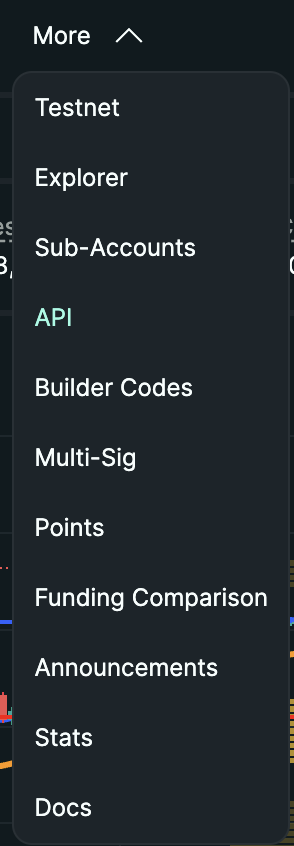
Open HyperLiquid and navigate to API / Agent settings. Log in to app.hyperliquid.xyz, go to Settings, then API or Agent Wallets.
-
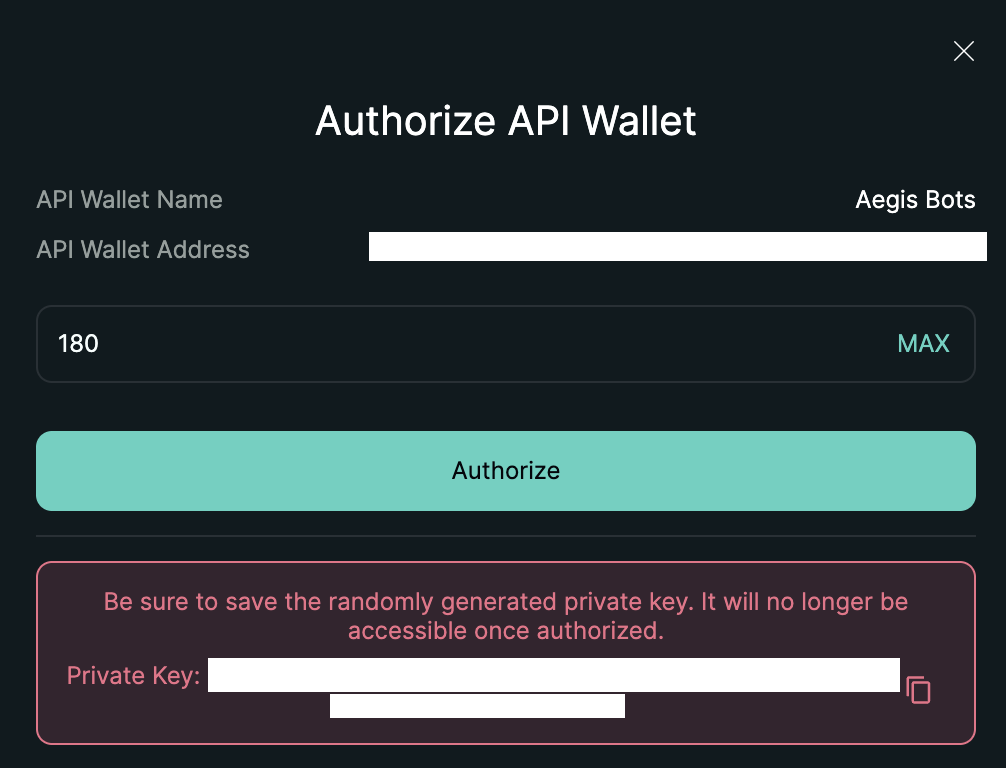
Generate a new agent wallet and copy its private key. Click Create Agent or Generate API Wallet. HyperLiquid generates a new wallet address and its private key (64 hex characters). This is a real ECDSA private key — not a traditional API secret with permission checkboxes. Copy and store it securely — it is shown only once. This private key is the value you enter in the Aegis dashboard as the HyperLiquid Signing Key (Agent Private Key); you do not enter the agent wallet address manually (Aegis derives it server-side). Also note your main HyperLiquid account address — you will enter that as the wallet address.

-
Authorize the agent wallet to trade. Confirm the authorization transaction in your main HyperLiquid wallet. The agent wallet now has trading permissions on your account. It cannot withdraw funds.


What to Enter in the Aegis Dashboard
Section titled “What to Enter in the Aegis Dashboard”When adding a HyperLiquid execution wallet in Aegis, the Add Wallet form asks for only two credential inputs — there is no manual “API key” field for HyperLiquid:
- Exchange: HyperLiquid
- Bot type: Bastion, Vanguard, or Orbit (mandatory, fixed at creation)
- Name / Label: a friendly identifier for this execution wallet
- Wallet address (
walletAddress): your main HyperLiquid account address — the account you authorized the agent wallet from. It is not the agent wallet address and not your LP wallet address. - HyperLiquid Signing Key (Agent Private Key): the agent wallet private key generated in step 2 (64 hex characters). This is the only credential HyperLiquid needs — there is no separate “API key” input.
After you save, Aegis derives the agent wallet address server-side from the
HyperLiquid Signing Key and displays it back to you on the confirmation
screen — you never type the agent wallet address yourself. The HyperLiquid
Signing Key (agent private key) is encrypted with AES-256-GCM at rest and
never shown back after saving. Aegis uses it to sign trading actions
(order, cancel, modify) server-side, autonomously, and without
per-transaction confirmation — the same way the agent wallet itself works
on HyperLiquid.
Contrast with Binance: a Binance execution wallet asks for an API key and an API secret — two exchange-issued strings, each scoped by permission checkboxes you configure when you create the key. HyperLiquid asks for the main account
walletAddressand the HyperLiquid Signing Key only — a single ECDSA private key with no permission checkboxes to configure. Its scope (“can sign trades, cannot withdraw or transfer”) is fixed by the agent wallet architecture itself, not by a setting you choose.
What the Signing Key Can and Cannot Do
Section titled “What the Signing Key Can and Cannot Do”HyperLiquid agent wallets are trading-only by design — this is not a
permission you enable or disable, it is a property of the agent wallet
itself. The agent wallet cannot withdraw funds and cannot move funds
between accounts: the executor only ever signs order / cancel /
modify actions; there is no withdraw, usdSend, spotSend, or
vaultTransfer capability anywhere in the signing path.
| Capability | Status |
|---|---|
| Read / Market data | Available |
Futures / Derivatives trading (order, cancel, modify) |
Available — this is what Aegis uses to hedge |
Withdraw funds (withdraw) |
Not possible — the agent wallet has no withdrawal capability, by design |
Internal / cross-account transfers (usdSend, spotSend, vaultTransfer) |
Not possible — the agent wallet has no transfer capability, by design |
| Bank / Fiat withdrawals | N/A for HyperLiquid |
If your HyperLiquid Signing Key is ever compromised, the exposure is operational — an attacker could place adverse trades on your account — not a withdrawal or custody risk, because the key itself cannot move funds. You can revoke it at any time from your main HyperLiquid account by deauthorizing the agent wallet under Settings > Agent Wallets (or API), which immediately stops it from signing further orders. This is separate from your owner wallet: Aegis never asks for your owner wallet’s private key or seed phrase, only ever this delegated agent wallet’s signing key.
Next Step
Section titled “Next Step”Add the execution wallet to the Aegis dashboard.
Last verified: 2026-05-12